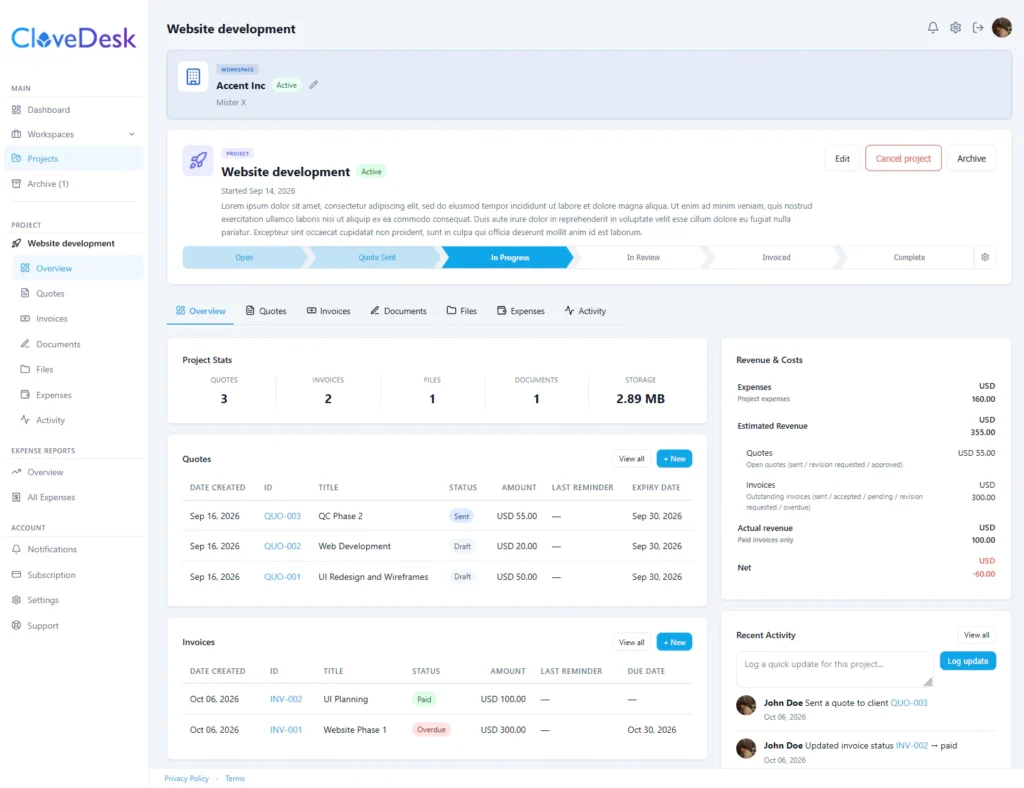
Send quotes, collect signatures, share files, invoice clients, and manage expenses all from one secure and branded portal. Clients log in with a magic link. No passwords, no friction. No Fluff Client Portal!
A client portal is a private, branded space where your client sees everything about their project in one place. Some people call it a customer portal or a client dashboard. CloveDesk gives each client their own workspace, so quotes, documents, files and invoices stop living in scattered email threads. Read More
Our features
Everything your client workflow needs in one client portal app
No duct-taping tools together. No per-transaction fees. One platform, one subscription.
Client workspaces
Give every client their own private workspace. It holds their details and every project for them, with quotes, invoices, documents, files and expenses kept together. Each workspace and project can have its own color and icon, so you always know where you are.
Quotes clients can approve online
Build a quote with line items, notes, terms and an expiry date, in many currencies, and send it by email. Your client opens it in the portal and approves it, asks for changes or declines. Every sent version is kept in the revision history, and an approved quote converts into an invoice in one step.
Invoices with payment links
Create invoices with payment terms and a due date, and let clients accept and sign or ask for changes. Save your own payment links (PayPal, Stripe, Wise and similar) so clients see a Pay button on the invoice, in the email and on the PDF. CloveDesk never handles the money. Overdue invoices are flagged automatically, and you can send payment reminders by hand or have them sent automatically.
E-signatures with an audit trail
Upload a contract, NDA or agreement and send it to your client to sign by drawing or typing their signature. Both sides receive the signed PDF by email, with a certificate page and an audit trail that records the signing. Quotes and invoices can be signed in the same way.
File sharing with control
Upload files of many types, including large ones, to a workspace or project. You choose which files each client can see, and the client is told about new files by email. Keep files tidy with labels, search and bulk actions, upload new versions without losing older ones, and discuss a file in a comment thread shared with the client.
A client portal with no passwords
Clients open a private link from their email and find their quotes, invoices, documents and files in one place, with search. They can approve, sign, decline, ask for changes, download signed copies and comment on files. No account, no password, no app to install.
Expense tracking and reports
Log expenses per workspace or project in many currencies, with categories. See revenue and costs on your dashboard and for every workspace and project, and run the expense report by period and workspace. It shows what a job really cost next to what you invoiced.
Follow-up and branding
See when a client opened a quote, invoice or document, and when they last visited the portal. A dashboard list shows items still waiting on the client, with one-click reminders. Add your business details to everything you send, and add your logo and brand colors to documents, emails and the client portal.
Yes. Start with a 30-day free trial, no credit card needed. After that, pick Basic or Pro to keep working.
Is CloveDesk a white label client portal?
CloveDesk is a branded client portal. Your logo, colors and business details appear throughout, and paid plans remove the Powered by CloveDesk mark. The portal runs on a CloveDesk address, and custom domains are not available.
How does client portal login work?
Clients don’t create accounts. They open the secure link from your email and land straight in their portal. You can send a fresh link any time.
Can clients pay invoices in the portal?
No. Clients can view and accept invoices, and you mark them paid after the money arrives through your own channel. You have the facility to attach your payment links in the invoice but the payment happens outside CloveDesk and there is no transaction fee on our end.
Can I use my own logo and colors?
Yes, all paid plans include branding options.
Is my clients’ data secure?
Every client sees only their own workspace, the data is stored on Cloudflare GDPR compliant server and backed up every day. Clients can only access by secure link, and signed documents carry an audit trail.
What happens when my trial ends?
Your data stays for 30 days in view-only mode. Upgrade any time to pick up where you left off.
Up and running in minutes
No complex setup. No integrations to wire. CloveDesk works out of the box from day one.
1. Create your account
2. Create a workspace
3. Manage everything in one place
4. Clients access via magic link
Sign up with Google or a magic link. No password required. Your account is ready instantly.
Each workspace is a private space for one client relationship. Add the client’s email to send them a magic link.
Upload files, send a quote, get it signed, and create an invoice, all from the same workspace, neatly organized in projects.
Your client clicks a link in their email and lands directly in their portal. No account to create, no password to forget.